
Identity management is finally getting the spotlight it deserves. According to Gartner, by 2025, 80% of enterprises will have adopted an identity-first security strategy, up from just 35% in 2020. If you think it’s just a gentle trend, it’s not, it’s a seismic shift in how businesses think about access, control, and trust.
When I work with organizations moving from Microsoft Identity Manager to modern IAM platforms, the conversation often starts with technology, but it never stays there for long. Once we unpack processes, licensing, integration, and long-term operations, it becomes clear that this isn’t just a technical migration. It’s a business decision with deep financial and compliance consequences.
Replacing MIM forces you to look at identity differently, not as a background process, but as a living system that shapes how people work, how risk is managed, and how money is spent. And that’s where the real story begins…
Microsoft Identity Manager was first released in 2010, but it was based on a merge of older solutions, including 2003’s Microsoft Identity Integration Server. For a technology this dated, it’s still surprisingly common in many organizations. MIM typically runs in on-premises or hybrid environments, and integrates with Active Directory and HR systems.
MIM was once the natural choice, because it fit neatly into Microsoft-centric environments. That was back when the cloud was still emerging and identity needs were way simpler. It also “stuck around” because it seemed affordable: many organizations already had MIM covered through Microsoft Enterprise Agreements or bundled software, meaning no extra licensing costs beyond infrastructure and maintenance.
But this two-decades-old technology isn’t built around automation, governance, access reviews, auditing, and modern authentication. All of these are now critical and sometimes, they either require complex workarounds or are impossible to implement altogether. And with MIM’s end-of-life support set for January 2029, there’s no long-term future for it. Organizations will eventually need to move to a modern IAM platform, and ideally, well before that date.
Migrating from MIM to a modern IAM platform isn’t the kind of project where you can simply say “it costs between X and Y.” That kind of statement wouldn’t mean much, because every organization starts from a different place. They have different integrations, custom workflows, compliance requirements, and infrastructure setups. In my experience, some migrations could take as little as a few months, while others can span up to 5 years.
Also, many IAM vendors don’t disclose their subscription costs online and instead offer pricing estimates on demand.
That said, there are a few consistent cost analysis factors I always look at when I run an estimate for a MIM replacement:
I also recommend running a total cost of ownership for the first 3-5 years post-migration. It’s important to consider potential license changes due to inflation, user growth, add-ons, ongoing support, and even audits.
While it’s complex, I do want to say that costs don’t have to catch you off guard. You can turn many of those “unknowns” into concrete, measurable items. The key is to go with a solid assessment of how your current IAM works and what your organization needs.
At Qwey, for instance, we always run a thorough assessment before recommending a MIM replacement. This allows us to estimate total costs with close accuracy.
Replacing MIM is never a straightforward job. Every time I’ve walked into one of these projects, it’s felt less like a migration and more like digital archaeology. On the surface, it’s about moving identity data to a new IAM platform. But, in reality, it’s about unearthing years of patches, scripts, and forgotten logic that somehow still keep things running.
Most MIM environments I’ve seen weren’t built to be replaced. They’ve been expanded bit by bit, stitched together with custom scripts, and adjusted every time something didn’t quite fit. By the time you start pulling on the first thread, you realize how much of it lives outside the system.
The biggest pain comes when something breaks. I’ve met teams who don’t even have a proper MIM admin anymore. The work usually lands on Active Directory or back-office people who try to fix problems without really knowing how MIM operates. Debugging becomes guesswork. I’ve seen them spend days trying to find out why one user didn’t get provisioned, only to fix it manually somewhere outside the system.
I’m often asked if it’s possible to manage an IAM solution without anyone in-house who truly understands it. Sure, it’s possible – but it’s a bad idea. Without internal ownership, the client becomes fully dependent on the vendor. Every issue becomes an escalation and every change, a billable request. I always insist that the client’s team gets proper training and that someone inside can at least read what’s going on under the hood. Otherwise, they’re renting the system instead of running it.
And even after the new IAM platform goes live, MIM has a way of hanging around. I’ve seen organizations proudly announce the switch to a new solution, yet MIM keeps running in the background because no one’s entirely sure what it still does. It’s safer to leave it on “just in case.” That’s the point where assessment becomes essential. Not the kind of box-ticking discovery, but real analysis. You need to know exactly what processes still depend on MIM before you can finally shut it down.
People sometimes assume that this assessment phase is what slows projects down. I view it differently. The real delays come when teams skip the hard work upfront. I’ve watched projects fail not because MIM was too complex, but because the new system was built on half-understood processes. When analysis and design are rushed, the new platform ends up doing only part of what it should, and the rest still happens by hand somewhere off-system.
When I talk to clients about migrating from MIM to modern IAM, the first thing I mention is compliance. Modern regulations don’t leave much room for legacy systems. Frameworks like GDPR, ISO 27001, or SOC 2 demand transparency, clear audit trails, and the ability to prove who had access to what, when, and why. MIM wasn’t built for that level of scrutiny. It was designed in a world where identity lived mostly on-prem and the world has since moved to hybrid and cloud.
Keeping MIM alive feels safe because it’s familiar. But in practice, it’s a growing liability. As Microsoft winds down support, the system’s ability to meet emerging security standards weakens. Each year adds more exposure including more risk of non-compliance, more potential for a breach, and more cost if one happens. The legacy IAM replacement cost isn’t just the migration budget but also the price of inaction. One GDPR fine, or one insurance audit failure, can easily outweigh the expense of a proper migration.
Security expectations have changed. Companies are no longer just assigning permissions; they’re proving business intent behind them. Modern IAM solutions allow for recurring access reviews and automated certification cycles, where every role and permission is verified on schedule. Users get access only when they need it and only for as long as they need it. That kind of governance is how organizations stay audit-ready and insurable.
In older IAM setups like MIM, users often had to figure out what rights to request, which resulted in confusion and overprovisioning. Modern IAM flips that model. Access is role-based and business-driven. A user doesn’t have to know the technical details of their privileges; they request a “role” that matches a business need, and the system automatically maps that to the right entitlements.
Replacing MIM with a modern IAM solution modernizes identity and strengthens the organization’s entire security posture. Automated provisioning and de-provisioning eliminate lingering accounts. Stronger authentication frameworks reduce attack surfaces. Cloud-native IAM platforms also come with built-in compliance reporting, meaning less time spent gathering logs before an audit and fewer blind spots during one.
Those improvements do more than make auditors happy; they directly lower cyber insurance premiums and reduce the financial impact of potential breaches. Security becomes measurable, and risk becomes something you can actually manage.
Every client I’ve worked with faces the same decision: run IAM in the cloud or keep it on-prem. Vendors like SailPoint and Omada offer both. One Identity leans more on-prem, which suits organizations with strict data control requirements like banks or government agencies.
Cloud IAM platforms simplify maintenance – you don’t worry about infrastructure or patching – but they come with less room for customization. If you rely on unique connectors or bespoke workflows, on-prem still wins. But each update then becomes a project in itself. Either way, replacing Microsoft Identity Manager means rethinking not just the tool, but the operating model behind it.
Modern IAM is about achieving a state where access, security, and accountability work together without constant manual intervention. For me, that’s the real measure of progress in any MIM to IAM migration. The technology is just the start, the real transformation happens when compliance stops being reactive and becomes part of how the organization operates every day.
In most identity systems, the user journey feels a bit like shopping online. You log in, find what you need, like an access rights or a specific role, add it to your cart, explain why, and send it for approval. The process might look different from one tool to another, but the principle is the same.
What separates modern IAM platforms is how effortless that experience becomes. Mechanisms like single sign-on, self-service access requests, and mobile-friendly portals take away a lot of the friction users are used to. Over time, that ease of use adds up to better productivity and clearer ROI.
It’s worth noting that cultural change plays a role, too. Moving to a modern IAM means users and admins have to adjust how they work. The ROI might not show up instantly, but with clear communication and early engagement, adoption happens faster and the long-term benefits can become visible much sooner.
Whenever someone asks me how to minimize the cost of migrating from MIM to modern IAM, my answer always starts the same way: analyze before you act. Too many projects rush into tool selection before anyone has a full picture of what actually needs replacing. The biggest savings come from slowing down at the start.
A good migration begins with understanding your existing identity processes and what your organization truly needs. I’ve seen teams skip this part, and it always ends the same way – with mismatched expectations and rework. HR thinks processes work one way, IT says another, and somewhere in between the system ends up doing neither. That’s why every successful MIM to IAM migration needs a strong analyst and an architect on board. People who know how to ask the right questions and challenge assumptions before anything gets built.
Once you’ve documented how things actually operate, you can compare products against real requirements. That’s the point where cost predictability starts. Without it, you’re just guessing, and guessing is expensive.
The legacy IAM replacement cost isn’t just the price of software licenses or implementation hours. It’s the price of bad planning. I’ve watched organizations overspend because they bought a solution that didn’t fit their processes. A clear, well-structured analysis not only avoids that, it also reduces the risk of being locked into costly rework or post-launch firefighting.
After go-live, there’s always a hypercare phase, usually a few weeks to a few months. That’s the time to stabilize the new system, iron out any inconsistencies, and make sure the team is confident using it. What happens next depends on the client. Some keep a small support contract for ongoing maintenance and consulting. Others schedule annual health checks, where I come back to review how the system performs and whether any processes need tuning.
Another model I’ve seen work well is a yearly block of consulting hours. The client can use those for small enhancements, analysis, or quick fixes without the overhead of a new contract every time. It’s flexible and keeps the system evolving without breaking the budget.
If you want to get a realistic sense of what a migration will cost – and which direction makes the most sense – start with a clear, structured plan.
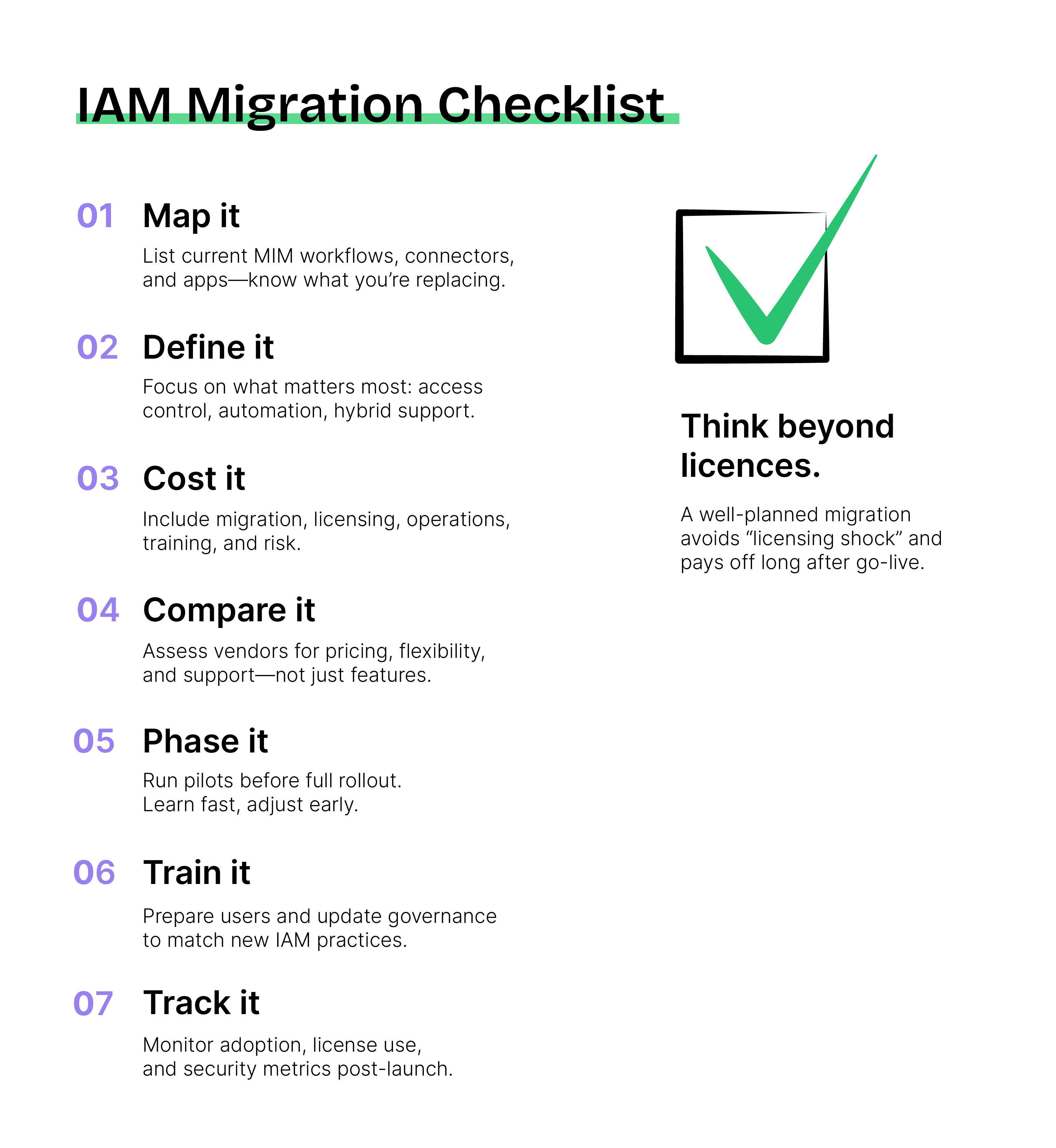
1. Map your current state
List what’s running under MIM today. Capture every workflow, connector, and integration point. Note how many users and applications are in play, and where they sit – on-prem or in the cloud.
2. Define what you actually need
Focus on business priorities, not features. Decide which modern IAM capabilities truly matter – whether that’s single sign-on, lifecycle automation, identity governance, or hybrid support.
3. Build a total cost picture
Include everything. Licensing, migration effort, parallel running, ongoing operations, training, and even risk. It’s the only way to see the true cost of ownership, not just the implementation bill.
4. Compare the right vendors
Look at how each solution fits your use case and pricing model. One Identity, Omada, and others all differ in how they license users, handle customization, and price support. Hidden costs can tilt the equation fast.
5. Plan the migration rhythm
Don’t rush into a full cutover. A phased transition lets you pilot, measure impact, and adjust before scaling up. It’s slower on paper but faster in practice when issues stay contained.
6. Prepare people, not just systems
Technology change fails when communication lags. Train users early, align stakeholders, and update governance models so the new IAM becomes part of daily operations, not just another IT project.
7. Keep checking-in
After go-live, monitor license usage, user adoption, support tickets, and access risks. The goal is to stay effective.
There’s no magic shortcut to replace Microsoft Identity Manager cheaply. But there is a smarter way. Plan thoroughly, involve the right people early, and treat analysis as an investment rather than an expense. Every hour spent understanding your current environment saves three later in implementation.
In my experience, the most predictable migrations aren’t the ones with the biggest budgets but those built on clarity, communication, and honest scope control. That’s what truly minimizes cost.