
Identity management is finally getting the spotlight it deserves. According to Gartner, by 2025, 80% of enterprises will have adopted an identity-first security strategy, up from just 35% in 2020. If you think it’s just a gentle trend, it’s not, it’s a seismic shift in how businesses think about access, control, and trust.
When I work with organizations moving from Microsoft Identity Manager to modern IAM platforms, the conversation often starts with technology, but it never stays there for long. Once we unpack processes, licensing, integration, and long-term operations, it becomes clear that this isn’t just a technical migration. It’s a business decision with deep financial and compliance consequences.
Replacing MIM forces you to look at identity differently, not as a background process, but as a living system that shapes how people work, how risk is managed, and how money is spent. And that’s where the real story begins…
In a nutshell:
- MIM migration is a business decision with deep financial and compliance consequences, not just a technical setup
- True costs go beyond licensing: legacy overhead, specialist staff, implementation, infrastructure, and parallel running
- Every MIM environment is different. Some migrations take months; others span up to 5 years
- Compliance frameworks like GDPR, ISO 27001, and SOC 2 demand visibility that MIM cannot easily provide
- Proper upfront analysis is the single most effective way to control MIM migration costs
Why MIM is still widely used – and why that’s a problem
Microsoft Identity Manager was first released in 2010, but it was based on a merge of older solutions, including 2003’s Microsoft Identity Integration Server. For a technology this dated, it’s still surprisingly common in many organizations. MIM typically runs in on-premises or hybrid environments, and integrates with Active Directory and HR systems.
MIM was once the natural choice, because it fit neatly into Microsoft-centric environments. That was back when the cloud was still emerging and identity needs were way simpler. It also “stuck around” because it seemed affordable: many organizations already had MIM covered through Microsoft Enterprise Agreements or bundled software, meaning no extra licensing costs beyond infrastructure and maintenance.
But this two-decades-old technology isn’t built around automation, governance, access reviews, auditing, and modern authentication. All of these are now critical and sometimes, they either require complex workarounds or are impossible to implement altogether. And with MIM’s end-of-life support set for January 2029, there’s no long-term future for it. Organizations will eventually need to move to a modern IAM platform, and ideally, well before that date.
The true cost of MIM migration: beyond the sticker price
Migrating from MIM to a modern IAM platform isn’t the kind of project where you can simply say “it costs between X and Y.” That kind of statement wouldn’t mean much, because every organization starts from a different place. They have different integrations, custom workflows, compliance requirements, and infrastructure setups. In my experience, some migrations could take as little as a few months, while others can span up to 5 years.
Also, many IAM vendors don’t disclose their subscription costs online and instead offer pricing estimates on demand.
That said, there are a few consistent cost analysis factors I always look at when I run an estimate for a MIM replacement:
- Legacy cost carry-over. By using MIM (or any legacy identity system), organizations continue paying for everything that supports it, like custom-built integrations, or – what’s often forgotten – manual overhead. This includes things like provisioning accounts by hand, handling password resets, or managing access requests through outdated workflows. Those manual processes translate into time, cost, and risk, all of which should be factored in when comparing MIM to modern, cloud-based IAM platforms.
- Specialist staff. Ideally, the company should have a specialist on board who still knows how to maintain and customize MIM. Their help is needed not only to help understand the various dependencies and custom-built workflows, but also to work hand-in-hand with the team responsible for the move to the new IAM solution. If such a specialist isn’t present, then the initial analysis run by an external vendor could take much longer and increase costs.
- Licence/subscription fees. Modern IAM solutions often shift from perpetual on-prem to subscription SaaS or hybrid licensing. Important note: these costs include the price of dual-running. Namely, when you migrate to a modern IAM, you may need to run both MIM and new IAM in parallel, at least during the transition period.
- Implementation & integration. These are typically the largest one-time costs and vary by number of systems and complexity. They include connector work, data mapping, workflow rebuilds, custom scripting, SSO and MFA integration, testing. For a full breakdown of what vendors often omit from quotes, see: What your MIM replacement vendor won’t tell you.
- Infrastructure & hosting. If you move to cloud SaaS you’ll reduce on-prem hardware spend, but will need to factor in migration costs, cloud consumption, and any temporary hosting needed during transition. Also, not all companies can keep their solution off-premises due to regulatory requirements.
I also recommend running a total cost of ownership for the first 3-5 years post-migration. It’s important to consider potential license changes due to inflation, user growth, add-ons, ongoing support, and even audits.
While it’s complex, I do want to say that costs don’t have to catch you off guard. You can turn many of those “unknowns” into concrete, measurable items. The key is to go with a solid assessment of how your current IAM works and what your organization needs.
At Qwey, for instance, we always run a thorough assessment before recommending a MIM replacement. This allows us to estimate total costs with close accuracy.
Cloud vs. on-premises: different cost structures
Every client I’ve worked with faces the same decision: run IAM in the cloud or keep it on-prem. Vendors like SailPoint and Omada offer both. One Identity leans more on-prem, which suits organizations with strict data control requirements like banks or government agencies.
Cloud IAM platforms simplify maintenance — you don’t worry about infrastructure or patching — but they come with less room for customization. If you rely on unique connectors or bespoke workflows, on-prem still wins. But each update then becomes a project in itself. Either way, replacing Microsoft Identity Manager means rethinking not just the tool, but the operating model behind it.
Want to calculate the true cost for your environment?
Book a free MIM cost assessment. We’ll map your dependencies, estimate migration effort, and help you build a realistic 3–5 year TCO. → Book a free assessment
Operational complexity: the hidden effort behind MIM migration
Replacing MIM is never a straightforward job. Every time I’ve walked into one of these projects, it’s felt less like a migration and more like digital archaeology. On the surface, it’s about moving identity data to a new IAM platform. But, in reality, it’s about unearthing years of patches, scripts, and forgotten logic that somehow still keep things running.
Most MIM environments I’ve seen weren’t built to be replaced. They’ve been expanded bit by bit, stitched together with custom scripts, and adjusted every time something didn’t quite fit. By the time you start pulling on the first thread, you realize how much of it lives outside the system.
When things break, they really break
The biggest pain comes when something breaks. I’ve met teams who don’t even have a proper MIM admin anymore. The work usually lands on Active Directory or back-office people who try to fix problems without really knowing how MIM operates. Debugging becomes guesswork. I’ve seen them spend days trying to find out why one user didn’t get provisioned, only to fix it manually somewhere outside the system.
The trap of vendor dependency
I’m often asked if it’s possible to manage an IAM solution without anyone in-house who truly understands it. Sure, it’s possible – but it’s a bad idea. Without internal ownership, the client becomes fully dependent on the vendor. Every issue becomes an escalation and every change, a billable request. I always insist that the client’s team gets proper training and that someone inside can at least read what’s going on under the hood. Otherwise, they’re renting the system instead of running it.
And even after the new IAM platform goes live, MIM has a way of hanging around. I’ve seen organizations proudly announce the switch to a new solution, yet MIM keeps running in the background because no one’s entirely sure what it still does. It’s safer to leave it on “just in case.” That’s the point where assessment becomes essential. Not the kind of box-ticking discovery, but real analysis. You need to know exactly what processes still depend on MIM before you can finally shut it down.
People sometimes assume that this assessment phase is what slows projects down. I view it differently. The real delays come when teams skip the hard work upfront. I’ve watched projects fail not because MIM was too complex, but because the new system was built on half-understood processes. When analysis and design are rushed, the new platform ends up doing only part of what it should, and the rest still happens by hand somewhere off-system.
Compliance, security and risks
When I talk to clients about migrating from MIM to modern IAM, the first thing I mention is compliance. Modern regulations don’t leave much room for legacy systems. Frameworks like GDPR, ISO 27001, or SOC 2 demand transparency, clear audit trails, and the ability to prove who had access to what, when, and why. MIM wasn’t built for that level of scrutiny. It was designed in a world where identity lived mostly on-prem and the world has since moved to hybrid and cloud.
The risk of staying on MIM
Keeping MIM alive feels safe because it’s familiar. But in practice, it’s a growing liability. As Microsoft winds down support, the system’s ability to meet emerging security standards weakens. Each year adds more exposure including more risk of non-compliance, more potential for a breach, and more cost if one happens. The legacy IAM replacement cost isn’t just the migration budget but also the price of inaction. One GDPR fine, or one insurance audit failure, can easily outweigh the expense of a proper migration.
From permissions to purpose
Security expectations have changed. Companies are no longer just assigning permissions; they’re proving business intent behind them. Modern IAM solutions allow for recurring access reviews and automated certification cycles, where every role and permission is verified on schedule. Users get access only when they need it and only for as long as they need it. That kind of governance is how organizations stay audit-ready and insurable.
In older IAM setups like MIM, users often had to figure out what rights to request, which resulted in confusion and overprovisioning. Modern IAM flips that model. Access is role-based and business-driven. A user doesn’t have to know the technical details of their privileges; they request a “role” that matches a business need, and the system automatically maps that to the right entitlements.
The security upside of modern IAM
Replacing MIM with a modern IAM solution modernizes identity and strengthens the organization’s entire security posture. Automated provisioning and de-provisioning eliminate lingering accounts. Stronger authentication frameworks reduce attack surfaces. Cloud-native IAM platforms also come with built-in compliance reporting, meaning less time spent gathering logs before an audit and fewer blind spots during one.
Those improvements do more than make auditors happy; they directly lower cyber insurance premiums and reduce the financial impact of potential breaches. Security becomes measurable, and risk becomes something you can actually manage.
Security as a business outcome, not a checkbox
Modern IAM is about achieving a state where access, security, and accountability work together without constant manual intervention. For me, that’s the real measure of progress in any MIM to IAM migration. The technology is just the start, the real transformation happens when compliance stops being reactive and becomes part of how the organization operates every day.
User experience and productivity impact
In most identity systems, the user journey feels a bit like shopping online. You log in, find what you need, like an access rights or a specific role, add it to your cart, explain why, and send it for approval. The process might look different from one tool to another, but the principle is the same.
What separates modern IAM platforms is how effortless that experience becomes. Mechanisms like single sign-on, self-service access requests, and mobile-friendly portals take away a lot of the friction users are used to. Over time, that ease of use adds up to better productivity and clearer ROI.
It’s worth noting that cultural change plays a role, too. Moving to a modern IAM means users and admins have to adjust how they work. The ROI might not show up instantly, but with clear communication and early engagement, adoption happens faster and the long-term benefits can become visible much sooner.
How to control MIM migration costs
Whenever someone asks me how to minimize the cost of migrating from MIM to modern IAM, my answer always starts the same way: analyze before you act. Too many projects rush into tool selection before anyone has a full picture of what actually needs replacing. The biggest savings come from slowing down at the start.
Start with a thorough analysis
A good migration begins with understanding your existing identity processes and what your organization truly needs. I’ve seen teams skip this part, and it always ends the same way – with mismatched expectations and rework. HR thinks processes work one way, IT says another, and somewhere in between the system ends up doing neither. That’s why every successful MIM to IAM migration needs a strong analyst and an architect on board. People who know how to ask the right questions and challenge assumptions before anything gets built.
Once you’ve documented how things actually operate, you can compare products against real requirements. That’s the point where cost predictability starts. Without it, you’re just guessing, and guessing is expensive.
Avoiding the legacy IAM replacement trap
The legacy IAM replacement cost isn’t just the price of software licenses or implementation hours. It’s the price of bad planning. I’ve watched organizations overspend because they bought a solution that didn’t fit their processes. A clear, well-structured analysis not only avoids that, it also reduces the risk of being locked into costly rework or post-launch firefighting.
Post-migration stability matters, too
After go-live, there’s always a hypercare phase, usually a few weeks to a few months. That’s the time to stabilize the new system, iron out any inconsistencies, and make sure the team is confident using it. What happens next depends on the client. Some keep a small support contract for ongoing maintenance and consulting. Others schedule annual health checks, where I come back to review how the system performs and whether any processes need tuning.
Another model I’ve seen work well is a yearly block of consulting hours. The client can use those for small enhancements, analysis, or quick fixes without the overhead of a new contract every time. It’s flexible and keeps the system evolving without breaking the budget
MIM migration planning checklist: 7 steps to control costs
If you want to get a realistic sense of what a migration will cost – and which direction makes the most sense – start with a clear, structured plan.
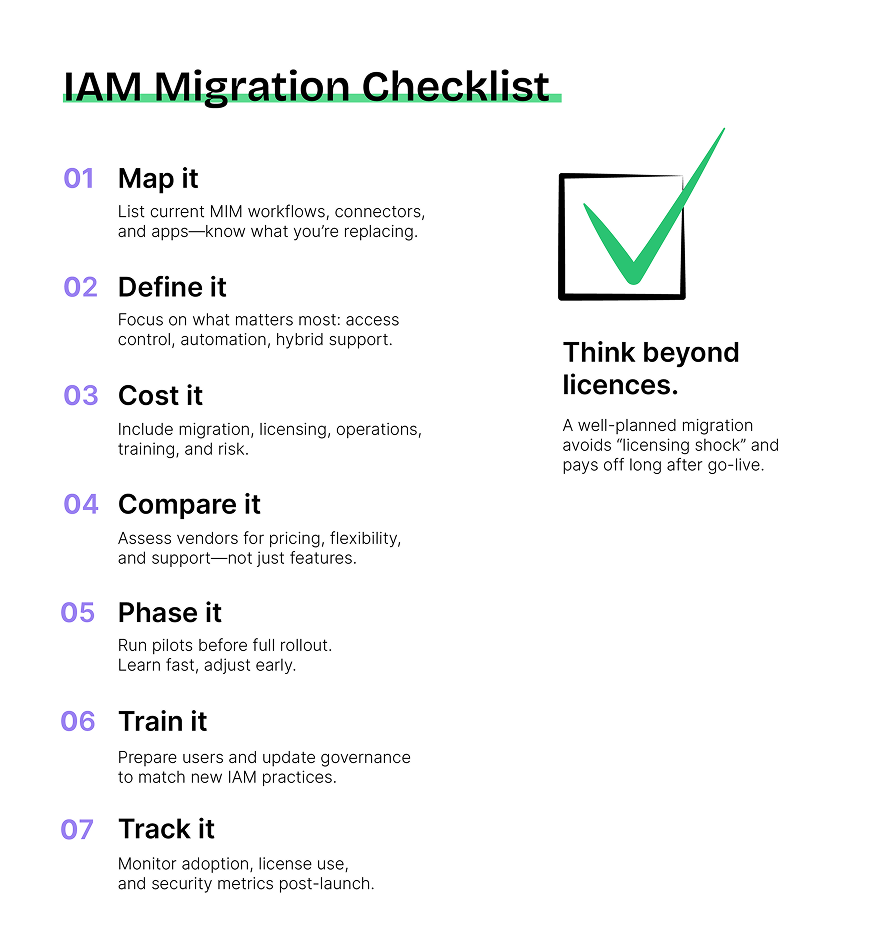
1. Map your current state
List what’s running under MIM today. Capture every workflow, connector, and integration point. Note how many users and applications are in play, and where they sit – on-prem or in the cloud.
2. Define what you actually need
Focus on business priorities, not features. Decide which modern IAM capabilities truly matter – whether that’s single sign-on, lifecycle automation, identity governance, or hybrid support.
3. Build a total cost picture
Include everything. Licensing, migration effort, parallel running, ongoing operations, training, and even risk. It’s the only way to see the true cost of ownership, not just the implementation bill.
4. Compare the right vendors
Look at how each solution fits your use case and pricing model. One Identity, Omada, and others all differ in how they license users, handle customization, and price support. Hidden costs can tilt the equation fast.
5. Plan the migration rhythm
Don’t rush into a full cutover. A phased transition lets you pilot, measure impact, and adjust before scaling up. It’s slower on paper but faster in practice when issues stay contained.
6. Prepare people, not just systems
Technology change fails when communication lags. Train users early, align stakeholders, and update governance models so the new IAM becomes part of daily operations, not just another IT project.
7. Keep checking in
After go-live, monitor license usage, user adoption, support tickets, and access risks. The goal is to stay effective.
Reducing costs starts with the right mindset
There’s no magic shortcut to replace Microsoft Identity Manager cheaply. But there is a smarter way. Plan thoroughly, involve the right people early, and treat analysis as an investment rather than an expense. Every hour spent understanding your current environment saves three later in implementation.
In my experience, the most predictable migrations aren’t the ones with the biggest budgets but those built on clarity, communication, and honest scope control. That’s what truly minimizes cost.
FAQ: MIM migration cost questions
What does it cost to migrate from MIM to a modern IAM platform?
MIM migration costs vary significantly by organization. Key cost categories include: legacy overhead (manual provisioning, workarounds), specialist staff, licensing and subscription fees, implementation and integration work, and infrastructure transition. Organizations should calculate total cost of ownership over 3–5 years, not just one-time migration expenses.
Why is MIM migration more expensive than expected?
Most MIM environments have accumulated years of undocumented custom scripts, workflows, and integrations. When migration begins, teams discover hidden dependencies and data quality issues. These discoveries extend timelines and increase costs. Thorough upfront analysis is the single most effective cost-control measure.
Should I choose SaaS or on-premises IAM to replace MIM?
SaaS removes infrastructure management but embeds those costs in higher subscription fees. On-premises can be more cost-effective long-term, especially for organizations with strict regulatory requirements or deep customization needs. The right model depends on internal capabilities, compliance obligations, and how much platform customization is required.
How long does a MIM migration typically take?
Timelines range from a few months to up to 5 years, depending on environment complexity. Most organizations underestimate scope because MIM dependencies aren’t fully visible until migration begins. Proper discovery and analysis before vendor selection significantly reduces timeline surprises.
What is the cost of staying on MIM past its 2029 end-of-life?
Staying on MIM after January 2029 end-of-life introduces compliance risk (GDPR, HIPAA, PCI DSS exposure), security breach liability, and rising operational costs as MIM specialists become harder to find. The cost of inaction often exceeds the cost of a planned migration.
Ready to calculate your true MIM migration cost? We run thorough MIM assessments that turn cost unknowns into measurable items — so you can plan, budget, and migrate with confidence. → Book a free MIM cost assessment
Intro
The clock is ticking, MIM’s end-of-life is just three years away. Many organizations realize a new identity solution is inevitable. But this necessary transition is not just about avoiding future risk, it’s also a massive opportunity. Your move from MIM is a chance to modernize identity operations for productivity, agility, and compliance.
We’ve covered the risks of staying put. Now, we’ll focus on the essential strategy: how to handle the move safely, make it efficient for your business in the long term, and preserve (or even raise) your security and compliance posture when shifting to a modern identity platform.
In a nutshell
- Moving from MIM is a full IAM modernization project
- The biggest challenge is hidden logic
- Security must be built into migration from day one
- Cloud IAM may require IGA tools
- Modern platforms enable Zero Trust & analytics
Understanding what needs to be recreated when leaving MIM
Moving off MIM is like rebuilding a historical, heavily customised vault and migrating its contents (in this case, identity data) to a modern security facility.
The transition can be precarious – you must ensure every access review and audit trail is perfectly mapped to the new system, and that the new facility is configured correctly.
As I explain below, the configuration doesn’t simply mean you’re moving a MIM-based mechanism into the new solution. It should allow you to apply modern protection features (like Zero Trust and Multi-Factor Authentication) that the old one couldn’t support.
The success hinges entirely on meticulous pre-migration planning and treating security as the primary architectural blueprint, not an afterthought.
How to migrate from MIM – step-by-step
- Audit MIM environment (identity sources, provisioning rules, lifecycle flows)
- Identify hidden logic (scripts, external databases, custom code)
- Select target platform based on compliance and cloud readiness
- Plan continuity (audit trails, phased cutover, parallel operation)
- Migrate and validate (RBAC, SoD, access reviews)
- Enable modern features (Zero Trust, MFA, identity analytics)
What MIM handles, and what needs to be moved or rebuilt in the new system:
While many people call the transition away from Microsoft Identity Manager a “migration”, it is a broader project, i.e., a profound IAM modernization effort.
The core challenge lies in mapping MIM’s functionality to a new, often cloud-based, environment. There are a few pillars that define MIM’s role and must be rebuilt in any Microsoft Identity Manager replacement.
Re-engineering identity flows
First, we must address the fundamental identity mechanics. Every connection, every logic step, and every flow that MIM handles should be properly recreated.
Identity sources
Each system, be it a Human Resources application or an organizational directory, provided data to MIM. Now, we must map these sources to new connectors, which entirely replace the functionality of the old MIM sync.
Provisioning rules
Every single instruction for a create, update, or disable action must find a clear, equivalent match within the new platform’s provisioning engine.
Group logic
MIM often governed group memberships. Any rule-based group, and certainly any group that required approval (which functions as a limited access request mechanism) must be rebuilt with precise, equivalent conditions in the new system.
Lifecycle flows
Finally, there’s the sequence of events for a joiner, mover, or leaver. These lifecycle steps require entirely new triggers, tasks, and termination actions designed for the modern platform.
Hidden logic problem
In my experience, the hardest part of this transition is not the “obvious” configuration pieces. I believe that provisioning workflows are relatively easy to review and analyze in the MIM console.
The most difficult aspects are the things no one knows about. MIM environments often have numerous surrounding scripts. This external custom code is the most challenging element because its function is frequently unknown. Often, people simply do not realize it exists outside the MIM boundaries. Furthermore, auxiliary databases often contain complex, bespoke logic, performing calculations that feed back into the identity system.
Finding and dissecting this surrounding logic is critical to avoiding post-migration failure.
Handling custom code
Custom code in MIM, frequently implemented as extensions, cannot simply be moved to a new platform. The reason why it’s so common is that it helped replace missing features or integrations. Custom-written code in MIM is typically configured through built-in provisioning rules or lifecycle flows in modern tools. We must analyze what it does and integrate that logic into the new environment’s standard processes.
I recall a specific client case where the identity solution, Omada, could not accurately calculate a unique username and email for users.
We developed a workaround, which involved a small application running in Azure that received a notification on a new user. It would then query the directory (Entra), calculate the unique attributes based on defined rules, check for uniqueness, and finally update the identity in Omada to allow the account creation.
Sometimes, a workaround like this is necessary. But it requires deep-dive sessions with the client to understand precisely how they need the process to function, not just how it functions now. The old MIM setup simply serves as a reference to observe the current behavior, but the new design must align with the desired target state.
Building a secure and compliant replacement for MIM – key considerations to keep in mind
As opposed to what many businesses believe, a secure Microsoft Identity Manager replacement doesn’t start with tooling. Security and compliance must be your priority that should shape the platform choice from the first design discussion.
I never treat them as migration checkpoints to validate at the end. Once you slip into that mindset the damage is already done.
1. Maintaining continuity – audit trails and access reviews during migration
Continuity breaks most often during analysis. I’ve seen migrations fail over small details that got skipped. Someone defines a condition for the happy path, but nobody asks what happens when that condition isn’t met. The workflow just stops without any fallback logic or audit trail. In a diagram, that gap looks harmless, but in production, it becomes a compliance issue.
Another common problem is misalignment between vendor and customer. A mechanism gets described and each side interprets it differently although both assume they’re on the same page. Then the system behaves in ways nobody expected. Access reviews stop reflecting reality and certifications lose their meaning.
Maintaining continuity during migration means preserving how decisions are made, and how they’re proven after the fact. This applies directly to access recertification and approvals that previously lived in Microsoft Identity Manager.
Here are a few key focus areas to maintain continuity:
Auditability
When you run systems in parallel, the evidence trail gets split. Part of the data still lives in your old MIM database, and the rest is on the new platform. Auditors don’t care about your migration plan; they only care if they can see the complete, end-to-end trail.
I’ve been through audits where teams had to spend hours explaining why approvals were handled across different systems. The process became slow and heavy. This wasn’t because the security controls were weak, but because they were scattered and fragmented.
Cloud IAM platforms add another headache. Yes, you get logs – lots of them. But who owns them? Ownership is often unclear. Someone needs to be tasked with collecting those logs, while someone else must be responsible for actually reading them. Without that clear accountability, identity governance stops being a useful control mechanism and just becomes a massive data dump.
Preventing security gaps
- A role is mapped too broadly during a test phase.
- An entitlement is transferred but loses its original restrictions.
- Quietly, the system becomes over-provisioned.
Security gaps rarely show up as a sudden, dramatic failure. They appear as a subtle “permission drift.”
Keeping your Role-Based Access Control (RBAC) and Separation of Duties rules intact requires serious discipline and non-stop validation. When the stakes are high, I always rely on phased cutovers and parallel operation periods. This strategy is critical because it:
- Exposes translation errors – the mismatches between the old and new system – early on.
- Keeps your rollback options realistic if something goes wrong.
Using supplemental governance
We need to stop seeing cloud directories as direct replacements for complex MIM systems. Even if an organization adopts a powerful tool like Entra ID, the level of governance depth it offers may not match what they enforced before. This is why supplemental Identity Governance and Administration (IGA) tools are often needed to close that gap.
I have seen this approach work wonders; it can patch governance holes very quickly.
However, I have also seen the downside where it can complicate audits. When controls span multiple systems, teams suddenly have to review access in two different places. If part of the work still runs through the legacy platform, the governance process becomes more demanding rather than the simpler solution everyone hoped for.
Segregation of duties (SoD)
Segregation of Duties (SoD) exists for one reason: to prevent conflicting access that leads to abuse or costly errors. Conceptually, these rules are simple but operationally, they are dangerously easy to weaken during a migration.
When an IAM modernization project begins, I insist that all SoD rules are written down in operational terms:
- Who is authorized to request access?
- Who is authorized to approve that access?
- And most importantly: Who must never do both?
These foundational rules must survive the move intact. If they fail even once during the migration, they will fail again later, I assure you. Preserving these rules is the ultimate test of whether your new platform deserves your trust.
2. Addressing data residency and compliance – cloud vs on-prem
When a client operates in a regulated industry, I always start by assessing their cloud maturity level rather than defaulting to on-premises.
Some regulated organizations are simply not cloud-ready. They might lack the necessary security framework, or they fear their sensitive data residing in a remote location. Others have addressed these concerns and are prepared to adopt cloud services under strict terms, often requiring specific data residency guarantees or dedicated environments. The decision is entirely determined by the organization’s current stage of readiness.
Here, I want to underline that cloud solutions present an inherent trade-off – they are less customizable. We must accept the functionality available out-of-the-box and configure within those boundaries.
On the other hand, on-premises solutions, while offering the flexibility of custom code, introduce the perpetual challenge of verifying and adapting that code every time the vendor releases a new version or update.
| Criterion | Cloud | On-premise |
| Customization | Limited | High |
| Maintenance | Vendor | Internal |
| Compliance | Shared | Full control |
Compliance – the non-negotiable in the choice between cloud and on-premise
When you move your identity services out of an on-premises system and into the cloud, you have to confirm that the service you’ve picked meets all the laws about where your sensitive data needs to live.
For this, you must understand the shared responsibility model. The cloud provider handles the security of the underlying foundation, i.e., the infrastructure. However, you, the cloud provider’s customer, are fully responsible for how you set up your identity policies and for watching out for any misuse. Getting the configuration wrong is a very common security mistake during migration, and it happens all the time.
I agree with Omada that, if your team doesn’t grasp good security practices within a cloud environment, you essentially make it easier for attackers to mess with your cloud-hosted Identity Governance and Administration (IGA). Cloud environments are incredibly interconnected, which often lets traffic bypass the firewalls and defenses you used to rely on.
For regulated industries, like finance or any company dealing with strict GDPR data, keeping tight controls is mandatory. Imagine a bank moving off MIM; they need meticulous, upfront planning to satisfy standards like SOX and GDPR. This starts with building compliance into the migration plan from the very first day.
3. Improving security posture with modern features
Moving away from MIM should never be about chasing new features for their own sake. It should focus on gaining visibility and control that your previous legacy platform simply couldn’t offer.
I don’t view the absence of modern features in MIM as an automatic security disaster; organizations survived for years without them. The real difference is awareness. Older systems executed processes, but they rarely showed you what was really happening with access across your entire environment.
Shifting to Zero Trust
This is where modern identity platforms change the conversation. Zero Trust is no longer just a diagram on a slide. The core assumption changes: every access request is treated as suspicious until proven otherwise.
That assumption alone forces better discipline across the board. Multi-Factor Authentication (MFA) and Single Sign-On (SSO) stop being optional improvements and become the absolute default for every interaction.
The power of identity analytics
However, the biggest shift I have seen comes from identity analytics. This is where identity governance moves from theory to real-world practice. Traditional MIM workflows granted access and then moved on. They never monitored the state of those permissions afterward. Modern IGA platforms do.
I remember seeing a compliance workbench view from Omada for the first time (you can see it below):
- All connected systems were visible in one place.
- Every entitlement was mapped to a specific person.
- The system clearly showed permissions that were explicitly approved versus those that were inherited.
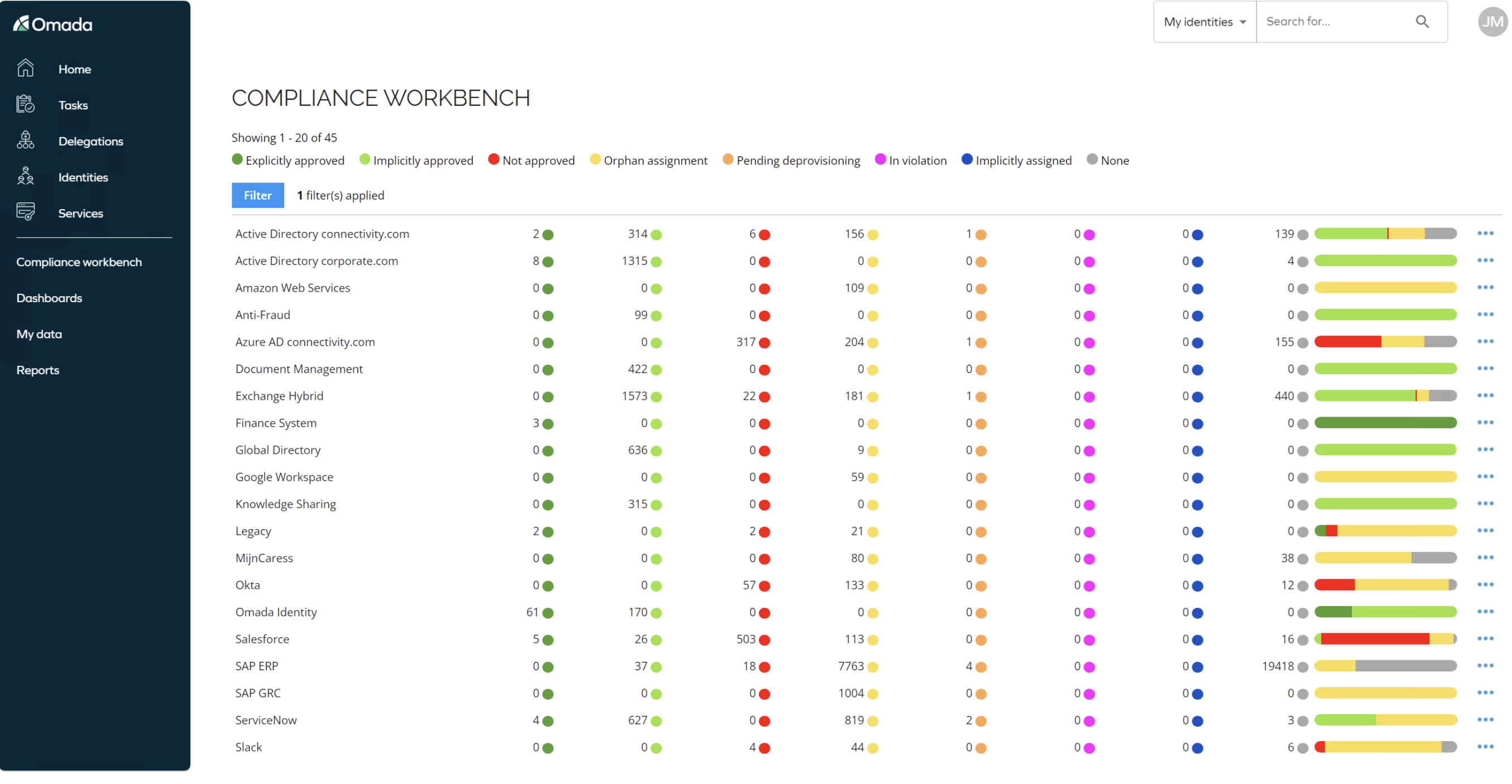
Most eye-opening were the permissions flagged as not approved. These were access rights that nobody, not even the system owner, could justify.
Breaking the cycle of forgotten access
This kind of report opens your eyes immediately. You suddenly see hundreds of entitlements in systems like Salesforce that shouldn’t exist. This usually isn’t malicious; it’s because access accumulates over time, and nobody ever cleans it up.
From here, the path is clear:
- You run certification campaigns.
- You remove what is no longer needed.
- You confirm what truly belongs
Once confirmed, the system remembers that decision. This finally breaks the cycle of forgotten access that quietly increases risk year after year.
MIM never did this, but a modern Microsoft Identity Manager replacement can. Not just because it’s newer, but because it treats access as something that must be observed continuously rather than granted once and forgotten.
4. MIM-migration expertise and training on the new solution
The move away from MIM is a specialized undertaking. While training internal teams or hiring new staff is an option, that path is often prohibitively costly and time-consuming.
In my experience, I rarely see organizations try to manage the migration build itself using only internal resources. They almost always engage professional services firms to implement the new solution. However, they frequently underestimate the weight of the pre-project analysis and the importance of selecting the right solution.
They might review vendor materials, run a quick proof of concept, and click through a few features. They see that the tool has certain features and think, “Okay, this will work.”
But if you don’t execute an upfront analysis properly, no matter how good the vendor is, the project will not deliver optimal results.
This is something you can address by working with an external identity expert. Among others, you:
Gain immediate expertise: you work with people who bring years of focused experience in the identity and data security domain and know the best practices for MIM replacement.
Lessen the decision pressure: the consultants take on the responsibility of deciding on the optimal technical solutions. Especially since your team lacks sufficient, hands-on experience with the new, modern platform.
Get dedicated focus: partnering means you have a team fully focused on the project execution. This allows your internal team to maintain concentration on your core services and business operations, ensuring minimum disruption and a higher quality implementation.
Frequently Asked Questions
What needs to be rebuilt when migrating from MIM?
When migrating from MIM, organizations must rebuild all core identity processes, not just move data. This includes identity sources such as HR systems and directories, provisioning rules for creating and updating accounts, group logic (including approval-based access), and full lifecycle processes like joiner, mover, and leaver flows. Each of these elements must be carefully mapped and redesigned in the new platform rather than simply copied.
What is the biggest challenge when leaving MIM?
The biggest challenge is hidden logic that exists outside the core MIM system. This includes external scripts, custom code, and auxiliary databases that often lack documentation. These components can perform critical identity functions, and organizations are frequently unaware of their full scope. Failing to identify and understand this hidden logic can lead to broken processes and security gaps after migration.
How do I maintain compliance during migration?
Maintaining compliance during MIM migration requires preserving how decisions are made and how they are documented. This means keeping complete audit trails, ensuring access reviews and approvals remain accurate, and maintaining Segregation of Duties (SoD) rules. It also involves validating identity processes during phased migration and avoiding gaps caused by running parallel systems without clear ownership of logs and controls.
Should I go for cloud or on-prem when replacing MIM?
The choice between cloud and on-prem depends on the organization’s compliance requirements and readiness. Cloud solutions offer scalability but require operating within predefined configurations and a shared responsibility model. On-prem solutions provide greater customization but require ongoing maintenance and validation of custom code. The right decision depends on regulatory constraints, data residency requirements, and the organization’s maturity in managing identity security.
Do I need external experts for MIM migration?
In most cases, yes. MIM migration is a specialized process that involves analyzing complex legacy environments, identifying hidden dependencies, and redesigning identity architecture. Organizations rarely have sufficient internal expertise to handle this end-to-end. External experts bring experience, proven methodologies, and focused execution, helping reduce risk and avoid costly mistakes during both planning and implementation.
How QWEY helps you move from MIM safely
The move away from legacy Identity Management (MIM) is inevitable. With proper planning, this transition can happen without impacting business operations or compromising security.
However, organizations delaying the move face escalating risks. Legacy systems were not built for today’s Zero Trust environment, leading to subtle security gaps like permission drift. Crucially, any delay will force compressed timelines later, resulting in control fragmentation and poor long-term choices under pressure.
A modern identity platform offers more than features; it provides the visibility and continuous control MIM never could. This shift to Identity Analytics turns governance into a continuous process which is the only way to audit permissions accurately and break the cycle of forgotten access.
QWEY offers comprehensive solutions for a controlled transition:
Immediate stability.
Our MIM Care service stabilizes and secures your current legacy environment, buying you critical time.
Strategic modernization.
We advise and implement modern, control-driven platforms, using Microsoft Entra ID, Omada Identity, and Azure cloud infrastructure.
Audit your MIM environment, stabilize legacy systems, and implement a secure IAM modernization with Entra ID and Omada. Let QWEY guide your move and take back control.
It appears that the IAM and cybersecurity industry are all holding their breath for a specific, (and not entirely optimistic) milestone – the first major security breach where an AI agent leads to catastrophic privilege escalation.
One Identity’s Alan Radford says that this is a consequence of an “AI goldrush“, and I couldn’t agree with this comparison strongly enough. We are seeing AI assistants graduate into AI agents – systems that act as “operational gatekeepers” with the autonomy to execute commands, manage workflows, and even modify production environments without a human in the loop.
What are the risks that can expose companies to this new type of a highly-privileged attack surface? A